UEFI News and Commentary

Showing posts with label UEFI. Show all posts

Saturday, April 21, 2018

The Oft-Rumored Death of UEFI's CSM Prophesied Again by Intel

Sometimes I feel like discussions about the death of the CSM (and thus legacy OS support in BIOS) to be somewhat akin to prophesying the return of Christ.  This has been the promise of UEFI since it was just a gleam in Intel's Itanium eye. Now Intel has publicly stated that they will not provide the related silicon pieces needed for delivering CSM in BIOS, starting with platforms that ship in 2020. The CSM (Compatibility Support Module) is the portion of the UEFI BIOS that delivers support for older operating systems, including DOS  and (surprisingly), Windows 7. The 16-bit x86 assembly looks sort of like someone took a 90's era BIOS, gutted it and attached the limbs to the UEFI torso.

[1]
For those of you keeping track, that would be two chipset generations from the current Cannon Lake/Coffee Lake generation. This would include legacy option ROMs for devices like video, NIC, RAID and ME as well as various testing and manufacturing tools that run under DOS (which relies on the CSM).

Windows 7 is a big sticking point, since was the last version (before Windows 10) adopted by many companies as their standard install version. But DOS is a hidden requirement that few people know or talk about, because they don't use DOS, but the manufacturers do, when they are building, testing and shipping the box.  

Why DOS? First, it is a low-overhead environment, putting few barriers between a testing or diagnostic application and the hardware. Second, it is free, in its FreeDOS incarnation. Third, because they have years of experience using it, with scripts, test tools and processes all built around it. Changes in this area introduces risk on the manufacturing line, and computer makers are risk-averse.

Intel would like to replace DOS with the UEFI Shell. It has many of the same intrinsic features (free, low hardware requirements). My feeling is that the UEFI shell is a great idea, but a lot of recent effort has ignored improving the built-in shell commands in favor of trying to support Python (see, AppPkg's Python port or more recent efforts to support MicroPython). Python is great, but I think that a little more work to port some command-prompt standards like printf and diskpart or ?.

What will it mean for BIOS manufacturers if the CSM and support for legacy OSes is removed? Certainly the fact that we don't have to test and validate tons of older, out-of-support OSes. Also, there is a lot of code for handling the "dual-boot" options that appear in setup. That is, we permit the user to choose legacy boot, UEFI boot, or auto-detect.  This adds a lot of complexity throughout the boot code.  Get rid of that and we can simplify. The other big area is hardware support. Even as new hardware standards, like USB-3 and NVMe have come along, support for these devices had to be added to the CSM, even though the CSM was never designed to support this. Oh, and we don't want to duplicate code, which has often caused code to be pushed into SMM so that it can be shared between legacy and UEFI OS. All of these to a simplification of the BIOS code and the effort required to validate it.

On the other hand, BIOS has always been the last bastion of compatibility with older standards. As I've often said, BIOS is where industry standards go to die...and then they stink. Anyone remember EISA, QEMM (not QEMU!) and using Flight Simulator as a BIOS test? The CSM was one of the pieces of firmware that was hard to reproduce in BIOS-something that forced people to talk to us, because there are few software companies with the necessary 30 year histories to remember why we did certain things. What will we do now?

That is the question, isn't it? What will we do now? Dang, now that we don't need to do CSM, we actually have time to do some more innovation! So, go on, let it die.

[1] "Last Mile" Barriers to Removing Legacy BIOS Fall 2017 UEFI Plugfest (October 2017), Brian Richardson (Intel Corporation) retrieved from http://www.uefi.org/sites/default/files/resources/Brian_Richardson_Intel_Final.pdf on 4/21/2018.


Sunday, April 01, 2018

UEFI Notes: CS2AI, UEFI Plugfest and the Zimmer Anniversary Post

After some gentle ribbing from colleagues at the UEFI plug-fest in Bellevue, WA, I've decided to try to keep track of recent trends in UEFI here again.

My collaborator on the UEFI shell book, Vincent Zimmer has posted some thoughts on open source and open platforms in his anniversary blog post here. He has a long history within the UEFI community and is currently working to lower the barrier of entry to server firmware design. And for the record, it is U-E-F-I (not YOO-FI or micro-EFI) and A-C-P-I (not AK-PIE). On a side note about competing acronym pronunciations, in the early days of the EISA (Extended ISA) bus architecture, it was pointed out that while English speakers naturally pronounced EISA as EEE-SA and ISA as AY-SA, other European languages had would naturally pronounce it exactly opposite (EISA as AY-SA and ISA as EE-SA).

Meanwhile, on the firmware security front, some focused industry organizations are doing a great job of bring the reality of these issues to professionals and college students. For example, CS2AI (with more than 15 chapters worldwide) zeroes in on control systems and how they present unique challenges for security, as well as the recent impacts of the Meltdown and Spectre with excellent Q&A afterwards.

The UEFI plugfest in Seattle this past week brought a host of security related presentations. I presented on "UEFI and the Security Development Lifecycle". Many of the same process disciplines are becoming a requirement in the BIOS world because of the attention BIOS security is now getting from hackers, academics and professionals. This is also raising interesting business issues for a low-margin industry that has traditionally assumed its obscurity made it a low-priority target.

Intel's CHIPSEC team had a great presentation on how their threat models have now expanded to include attackers who have physical access to the hardware. There was a lot of other good stuff, which I'll talk about when the presentations become publicly available.

Wednesday, June 07, 2017

UEFI Releases New Specifications and Adds ARM to the Board

For anyone who has been working on the UEFI specification, for the past few years, it should be no surprise to hear that UEFI has decided to welcome ARM onto the board of directors. This shows the growth of interest in firmware standards by the non-x86 world and also recognizes ARM's outstanding level of effort to improving the specifications. Dong Wei, who was the vice president of UEFI while at HP, now returns to the same role but now from ARM, where he is the senior director platform architecture. This seems like a smart move on both sides.

This announcement came on the heels of the release of a spate of new spec and test tool revisions. There are a whole bunch of goodies in here, from wifi and BlueTooth to new SMM (now called MM) models (including TrustZone!).


There are rumblings about another UEFI plugfest in the works. More on what's changes in the specs and other industry happenings later.

Sunday, May 21, 2017

Using C++ With EDK2, Part 1: new and delete

This is the first in a series of articles looking at what it takes to compile a UEFI C++ application under EDK2. This isn't an attempt to cover everything. I'm not a compiler library expert, so I'm not trying to port everything in the STL over. Nor am I a regular GCC user, so my efforts have been focused on Visual Studio 2015. Finally, I am focused on UEFI Shell applications, rather than normal UEFI apps or UEFI drivers.

I was initially intrigued by the fact that "#ifdef __cplusplus" occurs in several places. It appears in the StdLib header files, but that makes sense since they were originally a port from an environment that supported C++ and C. It also appears in the AutoGen.h files that are automatically created by the EDK2 build system for each module. It looks something like this:

#ifdef __cplusplus
extern "C" {
#endif

#include
#include
#include

extern GUID  gEfiCallerIdGuid;
extern CHAR8 *gEfiCallerBaseName;
...

// Guids
extern EFI_GUID gEfiAuthenticatedVariableGuid;
extern EFI_GUID gEfiVariableGuid;
...

// Definition of PCDs used in this module
#define _PCD_TOKEN_PcdFlashNvStorageVariableBase  5U
...
EFI_STATUS
EFIAPI
PeimInitializeVariableServices (
  IN       EFI_PEI_FILE_HANDLE  FileHandle,
  IN CONST EFI_PEI_SERVICES     **PeiServices
  );
...
#ifdef __cplusplus
}
#endif

That is, all of the C symbols that are automatically included into the build have the extern "C" linkage specifier placed around them so that they will handle calls from either C or C++ source code. So someone was thinking about C++.

For my solution, which is checked in on SourceForge here, I started simply by handling the necessary support for the new and delete operators, with no support for exceptions. This C++ library depends on the StdLib C library that comes with EDK2. For the most part, the C headers would work just fine, but two critical files (MdePkg/Include/Base.h and StdLib/Include/sys/EfiCDefs.h) generate errors when pulled in to C++ code. For now, I simply created new, slightly modified versions to work around the minor issues. This requres that your .inf file list the new library before listing the StdLib.

[Packages]
  SysLib/SysLib.dec
  StdLib/Stdlib.dec

This changes the include order so that, if there is a modified version for the C++ library, it will be preferred over the one in StdLib.

So far, only the new header file declares anything of substance. The others (wchar.h, stdlib.h, stdio.h) just provide wrappers for the StdLib that bring in the versions of Base.h and EfiCDefs.h that work with the library.

But the results are pretty nice. Assuming you don't need exception handling or the C++ standard library, you can use all of the normal C++ features, such as classes and inheritance and templates.

This is just the starting point. Over the next articles, I will expand the support for both the C++ and C libraries.

Wednesday, April 26, 2017

Maze Game Source Code

Feeling frustrated by the fact that I used bitmaps for all source code in the simple maze game articles I posted? Fret no more, the code has been checked in under BSD license here:

https://svn.code.sf.net/p/syslibforuefi/code/trunk

Look in Applications\Maze

Sunday, February 19, 2017

The UEFI Maze Game, Part 4

This is the fourth part of our series on a simple maze game built as a UEFI shell application. The first three parts discussed the main application, game loop and maze generation. This time, I will focus on UEFI's Graphics Output Protocol (GOP) and loading and decoding bitmaps from files.

The first part searches for the instances of the Graphics Output protocol in the system, chooses the one where the maze will be displayed and stores a pointer to it in a global variable.

Figure 1 - Find the Graphics Output Protocol, Bitmap.c

Line 25-35

Find all instances of the Graphics Output protocol that are available in the system. There can be one instance per graphical device in the system. Each one of the instances can be set to a different resolution and support a different number of colors. Rather than requiring the application to manage all of the devices, most systems use the Console Splitter driver, which acts as a meta-driver, aggregating the information from all of the drivers and drawing all bitmaps on all displays. The LocateHandleBuffer() function in the UEFI Boot Services allocates a buffer to hold all of the handles that support a specified protocol. 

Lines 37-46

Now that we have found handles for all drivers that support the Graphics Output protocol, we examine each handle to see if it also has an instance of the Device Path protocol. Why? Because the one way to distinguish the Console Splitter from all other graphical devices in the system is that it is not actually a hardware device. Since it is not a hardware device, it does not have a Device Path protocol associated with it, since the Device Path protocol used to describe how a device is attached to the system. If we find a handle that doesn't have an instance, the pointer to that instance of the Graphics Output protocol is saved in a global variable.

Lines 47-53

Now we just have to clean things up and return. First, we free the buffer that the system allocated when we called LocateHandleBuffer. Then, we check whether we found a Graphics Output protocol instance that meets our need and return TRUE if we did and FALSE if we did not.


Now, in the next section, we're going to dive into the meat of converting a buffer formatted as a Bitmap (BMP) into a format that can be used with the Graphics Output protocol.

Figure 2 - Converting .bmp Files to Graphics Output format, Bitmap.c

Lines 73-83

On entry, this function takes a buffer that is formatted following the BMP format (see here for more information), along with its size. On output, this function returns a pointer to an array of pixels (GopBlt), the size of that buffer in bytes (GopBltSize). The pixels are divided into PixelHeight rows, with each row containing PixelWidth pixels. Each of the output pixels is formatted as a EFI_GRAPHICS_OUTPUT_BLT_PIXEL structure. This structure has 8 bits for red, green and blue, and 8 reserved bits, making 32-bits per pixel.

Lines 85-98

These are the local variable declarations. BmpHeader and BmpColorMap are pointers to structures that are part of the BMP specification. The EDK2 implementation stores these structures in MdePkg\Include\IndustryStandard\Bmp.h.

Lines 100-104

A simple sanity check makes sure that the buffer passed in at least has the number of bytes required to hold the standard BMP format header structure. 

Figure 3 - Perform Sanity Checks on the BMP Header, Bitmap.c

Lines 106-108

Another basic sanity check is so see if the first couple of bytes in the file have the signature 'B' and 'M'. 

Lines 110-123

This function doesn't support all of the various sub-formats described in the BMP specification. For example, it doesn't support any of the compression formats or any of the extended headers.

Lines 125-137

This function then checks to see whether the data is 4-byte aligned, relative to the start of the buffer. Also, the remaining size of the buffer after the header should be equal to the size of the bitmap as specified in the bitmap header.


Lines 139-146

The color map translates bytes in the bitmap buffer portion of the BMP format into actual colors. The pixels in the bitmap are packed as 1-bit per pixel (2 colors), 4-bits per pixel (16 colors), 8-bits per pixel (256 colors) or the default (24-bits per pixel). The color map translates the bits-per-pixel in the bitmap into actual colors. So 0 might be black, but 1 might be blue (not black) and 2 might be green, etc.  

Lines 148-166

The number of pixels determines the size of the color map. So 1-bit per pixel has two possible color map values (0 and 1) while 4-bits per pixel has 16 possible color map values (0, 1...15). If there are 24-bits per pixel, then no color map is needed. The color map appears between the BMP header and the actual bitmap, so the function performs a sanity check to make sure that the color map is the right size.

Lines 168-172

Now the temporary Image and ImageHeader are set to the beginning of the image within the BMP format. Image will be incremented as pixels are processed while ImageHeader remains unchanged.

Figure 5 - Allocate Buffer to Hold Returned Bitmap, Bitmap.c

Lines 174-184

The function determines how much memory will be required to hold the returned bitmap based on the vertical and horizontal dimensions of the image. A sanity check makes sure that this doesn't result in multiplied value that is ridiculously large.

Lines 186-205

If the user passed in a buffer pointer via GopBlt, then try to use that buffer, as long as it is large enough. This improves performance by reusing a buffer, where possible. If it isn't large enough, it returns the EFI_OUT_OF_RESOURCES error to let the caller know the buffer was too small and returns the size that would be required. If the user did not pass in a buffer pointer via GopBlt, then the function allocates a buffer that is large enough. 

Lines 207-208

Now that we have the buffers, and the size, set the return size in pixels.

Lines 210-215

This outer loop cycles through all of the rows in the input image buffer, setting Blt to the first pixel in the output row. 

Line 216

This inner loop cycles through all of the packed pixels in an input image buffer row.

Line 217

Each of the following switch case statements deals with one way of packing pixels into bytes. Each of the case statements is responsible for leaving the loop counter Width and the output buffer pointer Blt in the correct location for the next iteration of the inner loop. 

Lines 218-232

This section handles the case whether there are 8 pixels packed in a single byte in the input image buffer. The loop works through all 8 bits, isolating the pixel value and then translating it to a full GOP pixel value in the output buffer using the color map.


Lines 234-250

This section handles the 4-bits per pixel case, where two pixels are packed into a single byte. Each half of the byte is translated into a pixel in the output bitmap using the color map. There is a special check for the case when there are an odd number of pixels on a line and this is the last byte in the input image buffer.

Lines 252-259

This section handles the 8-bits per pixel case, where a single pixel is packed into a single byte. Each byte is translated into a pixel in the output bitmap using the color map.

Lines 261-268

This section handles the 24-bits per pixel case, where a single pixel is packed into three bytes. No translation is done with the color map, since it is already in full color encoding. 


Lines 270-280

This section handles the case when the bitmap header specified anything other than 1, 4, 8 or 24-bits per pixel. In this case, buffers are freed and an error status code is returned. 

Lines 284-291

After finishing a single row, the input buffer pointer is bumped up to the next 32-bit boundary.

Line 293

At this point, we're all done and have a completely decoded bitmap.


The next section loads any file into memory.

Lines 297-303

This function loads an entire file into memory. On entry, the caller provides the path of the file. Since this is a shell application, the caller can use mappings such as FS0, FS1, etc. On exit, this function returns a pointer to the buffer containing the entire file's contents and the size of the file, in bytes.

Lines 305-308

Using the standard C library functions, the file is opened. If there is a problem, an error is returned.

Lines 310-312

Now that the file is open, see to the end in order to determine the file's size. Then return back to the start.

Lines 314-317

Now allocate a buffer large enough to hold the entire file, using the file size calculated.

Lines 319-322

Read the entire file into the allocated buffer, close the file and return.


Now we will wrap up this article with a helper function that uses all of the pieces we've introduced so far. This function reads a file into memory, converts it into a Graphics Output protocol bitmap, and then frees the allocated memory for the file.

Lines 327-333

On entry, the caller provides the path of the BMP format file to convert. On exit, this function returns a pointer to the bitmap, and the bitmap's width and height.

Lines 335-343

First, load the file into an allocated buffer.

Lines 345-357

Now convert the file into a GOP style bitmap.

Lines 359-360

Now free the memory occupied by the file (but not the bitmap) and return success.


Now we have come to the end of our little program. The files will be checked into the sourceforge repository in the next week.


Thursday, January 12, 2017

Firmware Bugs and Firmware Updates

My co-author and partner in various things UEFI, Vincent Zimmer, has penned some wise words about how firmware bugs are perceived on his blog (here). He quotes the first chapter of Embedded Firmware Solutions wherein an anonymous manager states, "If you can fix a hardware bug in firmware, it’s not a bug but a documentation issue."

What Vincent said about hardware used to be the same for operating systems. That is, it was often hard to (a) convince an OS company that they had a bug, (b) get them to fix that bug and (c) get that fix out to customers. But now, Patch Tuesday is a weekly event, monitored by websites everywhere. The OS images used by OEMs can have hot-fixes applied. So, now the situation is fixed. Hardware is the hardest to fix, followed by firmware, followed by the OS, followed by applications.

That is why firmware update has been a major focus of the recent UEFI specification updates, standardizing how 3rd party components can produce and process updates (c.f. capsules and the Firmware Management protocol, ESRT). These updates are not only for the system firmware's flash device, but also for the embedded flash on smaller chips, as well as attached USB and PCI devices. Security concerns, in particular, are driving the need for reliable and timely updates of all of these.

The next frontier is delivery of these firmware updates via the OS. While there has been some progress here by the OS vendors (Redhat, Microsoft, Canonical, see older summary here), there seems to be reluctance on the part of some OEMs. Part of this is that some of their unique value(if you can call the little tray icon apps "value") is getting sucked into the OS. Part of this is relying on the process by a 3rd party (or more than one 3rd parties) to deliver updates. Part of this is: older, out of production platforms aren't interesting any more. But highly publicized hacks and bugs are putting pressure on the industry to solve the distribution problem.

Whatever the case, platform stability rests solidly on firmware stability because of its unique capabilities to fix or mitigate hardware and OS issues, as testified to by Marvel's Agents of SHIELD.

Friday, October 03, 2014

Security to Eclipse User Features as Top 2015 Firmware Story

I stepped out on a limb this year and made a prediction. Predictions are notoriously fraught with peril and I am usually off-base or overly optimistic in mine. Nonetheless, as CTO of Insyde Software, I guess its also an unenviable part of my job. So here it goes:
'security' will eclipse 'lost my password', 'can't flash my BIOS' and 'overclocking' as the top firmware story in 2015.
For each of the previous hot firmware topics, the focus was on the user doing something correctly or incorrectly. The assumption was: if you don't do something dumb, your system will be ok.  Now, with security: even if the user doesn't do something dumb, it is possible that the system is not ok.

The OEMs (and firmware vendors) are now find themselves in the hot seat. Recent Black Hat presentations have increasingly focused on the vulnerabilities to be found in open source and closed source firmware implementations. Since firmware occupies such a privileged position in the software stack, successfully compromising it opens up a world of malware possibilities. With UEFI, the firmware has also become more capable and standardized, so more resources are theoretically available

The UEFI Forum has recognized this for a while and responded by creating a flexible OS secure boot and secure firmware update strategy in version 2.4 of the specification. The various software initiatives (including the open source ones) have followed quickly behind to implement these standards. But the security researchers and hackers began picking those apart, looking for and finding corner cases.

So the UEFI Forum responded by creating the USRT (UEFI Security Response Team), headed up by friend and former colleague, Dr. Dick Wilkins. The USRT provides a single point of contact for researchers to report their findings and disseminate those to silicon, software and system vendors.

At the same time, various UEFI Forum members, including Intel and my own company, Insyde Software, are producing domain-specific tools to test for certain well-known classes of vulnerabilities that are specific to our products. Intel has announced support for the CHIPSEC tool which evaluates the register settings in the motherboard chips to see if they are correctly configured to protect the firmware and boot process. Insyde is working on tools which check the various runtime interfaces we provide (and which OEMs extend) for classic API issues including buffer overflow and pointer validation.

Both UEFI's USRT plans and current firmware security tools will be discussed at the upcoming UEFI Plugfest, which is coming to Taipei from 13-17 October.

No one wants their company name featured in a security vulnerability press release. We'll talk again next year and see if my prediction is right.


Wednesday, September 03, 2014

New BIOS-Related Blogs

The first one is by my former colleague at Phoenix, Count Chu. He has already put together a number of interesting articles on parsing PDB files and the Design Pattern of the Report Status Code infrastructure.

The second is by William Leara, a BIOS developer at Dell, who writes on various topics of interest to BIOS developers (as the URL http://www.basicinputoutput.com/ might indicate), including using the UDK2014 and beautifier tools on EDK2.

Add this to Vincent Zimmer's intricate musings on firmware, security and technology in general on his blog and you have a pretty robust set of guru resources on BIOS.

Tuesday, August 19, 2014

ARM, Servers and the Shrink-Wrap OS

ARM just released the Server Base Boot Requirements document (more info here) which "defines the ARMv8 platform firmware abstractions necessary for OS deployment and boot, HW configuration and management, and power control" for servers that follow their SBSA specification. This is an important step so that OS vendors, like Red Hat and Microsoft, can produce "standard" operating systems distributions that work on any SBBR-compliant system.

What do you need to boot? Well, first of all, the operating system needs to detect all of the undetectable devices on the platform without a lot of poking and probing. That's because the standard OS image can only support a limited number of interrupt controllers, CPU memory management schemes, and high-resolution timers. So its a good idea if everyone can agree on a standard hardware architecture for these devices or, if not, a standard abstraction for how to talk to them. You don't want to use kernel configuration files, because that requires that the OS image is not the "standard" OS image, but rather one which has been modified for a specific SoC or specific board. So SBBR recommends the new ACPI 5.1 specification. People may not remember this, but one of the things that ACPI does (the "Configuration" part of the acronym) is provide a way to describe the hardware resources (memory, I/O, IRQ, DMA, etc.) used by non-enumerable devices and providing an identifier that the OS can use to load a specific device. The ACPI 5.1 specification did a few tweaks to that basic model for new ARM devices, but the same ideas are still valid.

Next, the operating system needs to be able to talk to the boot device long enough for it to be able to get its own drivers loaded. It is a sort of contract where the firmware finds the OS loader, validates it, and then jumps into it. But that OS loader then needs to load other files. Now it can try to put everything into a massive super-loader that can handle every device known to man or woman, or it can ask the firmware to read those files. That's why SBBR recommends UEFI 2.4, because UEFI has a well-defined mechanism for handing off control to OS loaders, loading files and then cleanly handing over control of devices to an OS driver.

How does the OS find out more information about the platform? Manufacturer name? DIMM types? Platform UUID? SBBR recommends the SMBIOS specification, version 2.8.0, published by the DMTF , which "addresses how motherboard and system vendors present management information about their products in a standard format" (see DSP0134).

Finally, ARM CPU cores can be arranged in a bewildering array of topologies, with an amazing variety of power states, can be described by the PSCI interface (from ARM and ACPI). This interface allows the interface to manage the tricky business of manipulating individual cores and managing the dependencies between them.

All of these work together to support the shrink-wrap experience. The goal: one DVD or one OS image can boot the system enough to get to the net and download any other updated or missing pieces. So standards that provide the pieces so that I can get my system to that point based on the information built into the firmware make everyone's job easier.


Tuesday, August 12, 2014

UEFI Forum releases the ACPI 5.1 Specification

For years, the ACPI specification was developed by what was essentially a 5-way tangle of an IP agreement between Microsoft, Intel, Toshiba, Phoenix and HP. It was a closed group with no simple way for new ideas and direction from outside.

After ACPI 5.0 was released, it became clear that if ACPI were going to have wider industry adoption, it would need to open up to a different sort of development process. At the UEFI board meetings (when I was with Phoenix), I saw most of the same companies and most of the same people as with ACPI. After much discussion between companies with large contingents of lawyers, the UEFI Forum took over management of ACPI and the UEFI board created the ASWG (ACPI Specification Working Group) to manage ACPI's development.

One of the first challenges after this change in management was to clean up the ACPI specification and make it more ARM AArch64 friendly. ACPI 5.0 had already paved the way with the Hardware-Reduced profile, removing many of the assumptions about hardware registers, processor states and bus hierarchies . These had been driven to some extent by Microsoft when Windows RT was on the horizon. For a description of the ACPI-related changes made by Linaro and other ARM partners, see this summary. Linaro has been very active in submitting kernel patch after kernel patch to modify the X86-only flavor of some of the Linux kernel pieces.

Now, with the release of the new ACPI 5.1 specification in a timely fashion, the remaining bits that didn't fit have been cleared away. There is still more work to be done, but at least Linux, ACPI an ARM have a clear path forward, both in terms of technology and open specification governance.

Tuesday, June 10, 2014

UEFI and SoCs and Chipsets and Firmware Complexity

When I switch back and forth between Insyde's x86 and ARM partners, I have to do a mental vocabulary switch. In the x86 world, we talk about "chipsets" but in the ARM side its almost universally "SoCs" Part of this is historical: the NEAT chipset was, in fact, a set of 3 chips that went alongside of the Intel CPU. More recently, there has been a traditional division of labor between the north bridge (memory controller) and south bridge (I/O controller). This split allowed CPU, memory and I/O technologies to progress at different speeds and allow for different pairings to meet different market requirements. But in the ARM world, the term SoC (system-on-a-chip) is recognized as a single-chip packaging of a CPU and all of the attendant hardware bits that are needed. New technology? Just spin a new SoC. The X86 world has responded with single-chip solutions, but the term 'chipset' still dominates.

In many ways, this difference in philosophy is reflected in firmware architectures. UEFI is designed for many hardware pieces, likely from different vendors, are combined together to boot an operating system. The fundamental unit of UEFI is a driver (or a module if you include PEI and you're a grognard for terminology). You add drivers for specific chips and attendant technologies. You remove drivers that you don't need. Seems logical, right?

But as gate density has increased, the number of technologies that can be stuffed into a single chip has also increased. Then the number of UEFI drivers increases. The difference can be startling: the number of modules (libraries, drivers and modules) required to support one chipset can be 10x more than the number required to support another.

Is this reasonable? If I have one chip on the motherboard, it seems reasonable that I should add 1 thing (driver, module, package, whatever) to the build. That would be my ideal world.

Indeed, there are initiatives going that direction. My friend, Intel guru Vincent Zimmer recently wrote about Intel's FSP (Firmware Support Package) on his blog. The FSP attempts to hide some of the complexity by packaging up most of the chip-support firmware into a single binary blob with three entry points. Dig a little deeper and you find that this "blob" is really a specially formatted UEFI firmware volume with PEI drivers (aka PEIMs). But, along with binary editing of board-specific options, it provides a good starting point to answering the objections of silicon-related firmware complexity. It still struggles with all of the traditional problems of binary deliverables, such as debugging and hot fixes. And it doesn't solve everything for industry standards like ACPI and SMBIOS and even UEFI's own HII. Not to mention OS-specific add-ons (like those for Windows 8.1) It tries to maintain the flexibility of UEFI while simplifying the silicon vendor side of the equation. Good start.

Insyde (my company) has been pursuing this at the source code level, improving  how entire chip "packages" (an EDK2 term) come together to create the final firmware. Our goal: 1 command brings in the entire support for a chip. Sure, tweak it from there. Sure, highlight the couple of places where engineer input is required at build. But don't make them find a read-me. Oh, and do it the same way for every chipset/SoC because when SoCs change often, your mind spins with which/where/what in a codebase.

One of the hidden advantages of the UEFI driver model is that it works well for SoCs as well. In order to keep up with new technologies, silicon vendors keep spinning new versions of their SoCs with new sets of peripherals, new versions of memory controllers and upgraded CPU cores. Many of these SoCs share the exact same IP blocks inside, with only a few tweaks. From a firmware perspective, I'd like to grab the same piece of code and use it to support all of the SoCs in which the IP block is included. Sounds like a driver model to me, based no longer on chips on a motherboard but on IP blocks in a chip.

Longer term, that means that some firmware complexity creep is inevitable as SoCs increase in complexity. But it also means that firmware systems must improve to support the increased rate of SoC/chipset change and reduce the effort required to configure and customize those platforms. Inevitably, the BIOS guys get blamed for every delay: the motherboard is ready, the chip is ready, so why isn't the BIOS ready? Simulation (another topic) is one way. Runtime debug/log infrastructures help catch what you missed. But well-designed build systems and firmware delivery models simplify the problem up front.

Friday, April 04, 2014

The Tale of Three Conferences

This week has been a blizzard of news and announcements from three conferences that I care about, all this week. First, there was EELive! in San Jose, CA which focused on embedded systems (or, as they now like to call it, the IoT). Second, there was Intel's Developer Forum in Shenzhen, China where my company (Insyde Software) was exhibiting and speaking. Finally, there was Microsoft's Build 2014 which I was watching with avid interest with live streaming and press releases flowing. UEFI was there, to either be promoted or vilified or both, in all three.

At first glance, at EELive, you would think that no one is paying attention to UEFI. Part of this was because Intel was busy promoting FSP, touting how it could be plugged into any boot loader, including coreboot. But the Galileo board that they were showing comes with a UEFI solution. And, under the hood, FSP is really extracted firmware drivers from Intel's UEFI-based reference code, packaged in UEFI-standard firmware volume format, with a little director binary inserted to allow direct calls into the driver entry points. The other reason is that 32-bit and smaller processors still dominate the IoT space and many of those are ARM designs. ARM platform 32-bit designs have used other boot loaders traditionally, but with 64-bit ARM itself is heavily pushing UEFI as a standard boot architecture. Many discussions around UEFI have to do with complexity. And there is something to these discussions, since the very power and flexibility of UEFI has led to implementations (like that on tianocore.org) which are broken into hundreds of pieces, where assembling the right one requires the right recipes. Most embedded vendors don't need their firmware distribution to be as complicated as their Linux distribution (see yoctoproject.org).

Then there's IDF. Of course, there was the Insyde poster chat: Implementing Dual OS Solutions with UEFI FIrmware" (how to switch between two active OS sessions w/just firmware support). Intel delivered their obligatory Quark and FSP remarks. But it also put out two additional UEFI-related notes. The first appeared in the unlikely session titled "Delivering Compelling User Experiences on Intel® Platforms: Audio, Voice, Speech and Fingerprint Sensors and Biometric Authentication" But in the very back of this presentation, they talked about security issues pertinent to BIOS, including replay-attack prevention related to Real-Time Clock battery removal and secure firmware updates using the UEFI capsule update method described in the UEFI 2.4 specification. It really seemed out of place, but hey... They also recommend adding their new CHIPSEC tool, which performs security checks on chipset and firmware settings. It is available on github.

And then the Intel Android team showed their Android build tool which would create a BSP for your platform and hey, it would also customize your firmware at the same time. It leverages the Unified Binary Management Suite (UBMS), which you can see here at about the 21 minute mark. This shows the increasing co-design process required for configuring your firmware and your OS installation. Many times, the firmware and the OS need to know the same types of information about the platform. For example, which drivers to include, GPIO routing, etc. Especially on OS' that don't use ACPI and that don't rely on the firmware passing them anything (like Android).

Finally, there's Microsoft Build event. We got a definitive date for the Update 1 (with no major new BIOS requirements! Sigh of relief), Microsoft's plan to offer Windows for $0 for certain platforms, Windows booting on Quark(!). And a lot of advice about how to integrate off-SoC sensors and how to write apps that span Windows and Windows Phone.

Hard to breathe. Need air. Next week I'll have a chance to reflect further on what some of these mean. How can we take advantage of vertical integration? How can we reassure folks of security in a world where firmware is increasingly decentralized and under attack? (Did I mention EELive! had a Black Hat track???) More later....

Tuesday, April 01, 2014

Something About the Game I Made with a Thermometer In It

After making the simple app that uses composite images and transparency to change the appearance of an image based on user input (as described in this article), I decided to expand it a little into the beginnings of a simple game.  As it is now, it is simply a shell for a game, in which you can move a sprite around and change modes.

In this article, I will describe the thought process behind creating this as well as the code I wrote.  This article assumes you have read the referenced article above on composite images and transparency.

Source code for this project can be found here.

I knew I wanted this "game" to include the thermometer I had created, and have something affected by the changing temperature.  I decided I could have a little character run around the screen and his color would change with the temperature.  Because I was using the same thermometer as I did in my last project, I was able to use the same code.  The only change I made was a simple image re-size to make it a little smaller.

The next question was how I wanted the playable area to be laid out.  Would it be laid out in a grid, where each object occupied a square, or would it be free movement?  Since collision detection in a free movement environment is much trickier than a grid, I decided to lay it out in a grid.  This was a fairly easy thing to implement.

First, I created a struct to represent a square in the grid, which I called "Box."  It has it's X and Y coordinates, an array containing pointers to the adjacent Boxes in each of the four cardinal directions, and a boolean value indicating whether or not the box is occupied by an object.


The next step was to initialize the grid, which is simply an array of boxes.  So I started by clearing all the memory and initializing the first box's coordinates to (0, 0).
Now from here, I could have hard-coded all the values for every single box, but if I had decided to change the size of the grid, it would have been a big pain to rewrite, so I wrote a loop that initialized the coordinates and array of adjacent boxes for each box.  For each of the boxes, I first set it's Occupied value to false (since each box is initially empty).  I first then look in the East (right) direction to see if the box is on the right edge of the grid.  If it's not, the East adjacent box is initialized to the next box in the array, and if not, East is set to NULL.  Next, I check the North (up) direction to see if it is on the top edge of the grid.  Like the East check, I initialize the North box if it's not on the top edge, and set it to NULL if it is on the top edge. 

So along with initializing the array of boxes, we also need to initialize the coordinates, which we can do in the checks for the West edge.  We can do as we have done with North and East, and initialize the West value.  However, after that, we can begin initializing coordinates.  If the box is not on the West (left) edge of the grid, then it can base its X coordinate on the box to its left, and simply add the width of an image (which is the same as the width of a box).  Its Y coordinate is simply the same as the box to its left.  If it is a left-edge box, then its X coordinate is 0, and the Y coordinate can be gotten by adding the box height to the Y coordinate of the box above it.  Finally, we do the South check, just like the others were done, and finish initialization of the boxes.

Now I needed to deal with the images.  In this application, I had six images: the background image, the character sprite, an object sprite, and the three thermometer images.  I did the same thing as described in the articles referenced above, except with more images.  All the image setup was done in the same function, and the image buffers stored in global variables.  Details about the image setup can be seen in the previous articles or the source code (link provided above).  In the source code, I have included a miniature .FDF file that includes the additional lines I added which allow the appropriate images to be included.  In order to use this, copy the text from my .FDF file and paste it into the FILE statements section of Nt32Pkg.FDF.

The only thing I did differently with regards to image display was in ConvertBmpToGopBlt().  One of the conditions for images was unnecessarily strict, and would sometimes cause the function to falsely report an invalid bitmap image, so I removed it.  The line used to read:
if ((BmpHeader->Size != BmpImageSize) || 
      (BmpHeader->Size < BmpHeader->ImageOffset) ||
      (BmpHeader->Size - BmpHeader->ImageOffset !=  BmpHeader->PixelHeight * DataSizePerLine)) {
    return EFI_INVALID_PARAMETER;
  }
I removed the third condition so it now reads:
if ((BmpHeader->Size != BmpImageSize) || (BmpHeader->Size < BmpHeader->ImageOffset)) { return EFI_INVALID_PARAMETER; }
Which causes it to work properly.

Before we move onto the components of the actual game, we need to remember that in this game, we will be moving around a character as well as changing the temperature on the thermometer.  We could use different keys to change the temperature and move around, but I decided it would be best if the character were standing still while the temperature changed, so I made it so that the user could change which "mode" they were in, movement, or temperature change.  The mode is implemented using an enum, and stored in a global variable.

Up next is the actual character itself that the user can move around.  It contains a pointer to the buffer containing the original image, a pointer to the altered image (since we are going to change the image's color over the course of the game), its coordinates, and the box it is currently occupying.  We make the character a global variable, since there is only one.

Initializing the character struct is simple and can be done as soon as the images and grid are set up.  We first set the mode to be "MOVE" since we would like that to be the initial setting.  Image is set to point to the buffer referenced by the global variable.  The image is then copied into a new buffer, and ChangedImage points to that new buffer.  This way, ChangedImage can be altered without affecting the base original image.  Then, the coordinates and box are set to be the upper left-hand corner (just an arbitrary position).
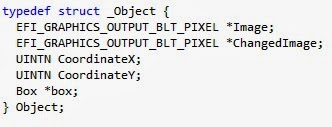
After this, I decided to have some sort of additional object on the map along with the character.  So I created a basic Object struct.  It has an Image, ChangedImage, coordinates, and box it occupies.  This is actually basically the same as the Character struct, and in the future, I could go back and combine the two into one.  There is only one non-character object in this application, but multiple objects could simply be stored in a global array.

Initializing and setting up objects is similar to that of initializing the character.  In this program, I only included one object, but it would be simple enough to expand the function to deal with multiple objects.  Like the character image initialization, we set Image to be the globally accessible buffer, and ChangedImage to be a copy of the Image buffer.  The coordinates and grid position are set, and then we set the assigned box to be occupied.

Now we turn our attentions towards player actions.  The first and most basic action a player can take is to move.  Since we used a grid, the movement is easy to do.  Basically all it does is check the box adjacent to where the character currently is, and see if it is null or occupied.  If not, it changes the character's box and coordinates to that of its new location.

The next is its color change.  Now, this method does nothing incredibly special.  It simply multiplies the pixel colors by the percentage height difference of the thermometer.  It makes sure the colors never go above their maximum value, and are never negative.  The nice thing about this is that will not alter black pixels (which, in my implementation are interpreted as transparent), so pixels intended to be transparent will remain that way, whatever color changes might occur.  Notice that the transformations are based on the original image's color.  This way, colors at a given temperature are always the same. Another possible implementation of this is to have the blue color increase and red decrease as the temperature decreases, and vise versa as the temperature increases.  

Finally we get to the actual game loop itself.  It is just a do-while loop that waits until an end condition is reached (in this case, until the END key on the keyboard is pressed).  All it does is sit around and wait for the user to press a key on the keyboard.  If it's one of the arrow keys, and the game is in MOVE mode, it moves the character.  Otherwise, if it's in TEMP mode, it will change the temperature and change the player's color only if it's an up or down arrow key.  In this implementation, the mode is changed by pressing the PgUp key.  After that, it displays the images in their new positions.  Once the end condition has been met, the memory is freed, screen cleared, and we return success! In the images below, the image on the left shows the key scanning, and the right image shows the image display and cleanup.


And that's all she wrote!  

Friday, January 24, 2014

UEFI: A Retrospective

This nifty article by my friend and co-author Vincent Zimmer takes a look at the UEFI specification from his perspective as one of its early proponents within Intel, as an author (Beyond BIOS), and more recently as a steward of the specification and innovator post-UEFI.

From my perspective as a BIOS architect, the process was never a smooth one. The rise of the industry specification bodies is something we take for granted. If you look at older PC specifications, like ACPI and APM and BBS, they were cooperatively developed by a small cadre of companies, like Microsoft, Toshiba, Phoenix and Compaq. As EFI was coming along from Intel, the BIOS vendors were also developing standards and promoting these standards. Never heard of PowerBIOS from Award? Or how about Manticore or CSI from Phoenix? With the industry standards group approach, any one of these could have become what UEFI is now. Maybe. If the originating company was willing to loosen their grip. It was, in accepting this key point, what allowed Intel and their partners like HP to gain critical agreement within the PC ecosystem.

Sometimes relinquishing control gets you what you want, but the process is more chaotic. Certainly true for UEFI.


Thursday, October 31, 2013

Linux and UEFI: Linaro and LinuxCon

This week I've spent hanging around Linaro Connect 2013 USA, which is dedicated to bringing all of the open-source (and Linux) goodness to the ARM platform. For the 64-bit ARM architecture (AArch64), they have been promoting UEFI for quite a while but Linaro and its members are doing a lot of the really hard work of making sure that is a reality, with engineers dedicated to working from the reset vector up through the Linux kernel and into some server applications, making sure that all the necessary bits are there in open source. There were a lot of sessions this week that deal with the thorny issues of UEFI (secure boot), power management (PSCI) and ACPI (interaction with existing drivers and FDT).  To top it off, this event was co-located with ARM TechCon which doubled the fun, including an interesting keynote by Simon Segars, CEO or ARM.

This follows on the heels of the UEFI Plugfest, which was co-located also, but with LinuxCon in New Orleans. My colleague, Jeff Wheeler from Insyde got to attend, and he found folks interested in the question, "Does it really work?" And the answer was, "Yes, it does" This is the impression I recently found from  Bruno Cornec's blog article "First UEFI PlugFest for Linuxers". Good communication, good testing and, more importantly, UEFI and Linux work together.

The relationship between Linux and UEFI has not always been easy, with conspiracy theories and suspicious kicking of tires. But these two events have shown that they can and do work together, on x86 and ARM.

Tuesday, October 29, 2013

ACPI Specification Now Managed By UEFI, and Why Anyone Should Care

This article by my UEFI colleagues Dong Wei (HP, VP of UEFI) and Andrew Sloss (ARM, ARM Binding Sub-Team Chair) talks about a large recent development in the firmware world: ACPI is now managed by UEFI. I was a part of the ACPI specification development starting with ACPI 2.0 up through the current ACPI 5.0 specification while I was employed with Phoenix Technologies. That specification seems unusual to me now, in that it was essentially a five-way agreement between Intel, Microsoft, Compaq/HP, Phoenix and Toshiba. But actually, back in the day when it was conceived, it wasn't that unusual, as the BIOS Boot Specification (BBS) or Advanced Power Management (APM) will attest. For every revision of the specification, essentially the 5-way consortium was reborn again, occasionally (such as when Phoenix was added or Compaq was merged with HP) with a change of membership.

Due to the unusual structure and the fact that it was tied in many ways to Microsoft's release schedule and Intel's hardware schedule, releases tended to be big and cumbersome. Adding new members was problematic, since the number of signatures required from legal departments grows exponentially.

On the other hand, UEFI has functioned pretty well since 2005 in taking input, releasing regular errata and specification updates. So with Mark Doran (Intel, UEFI president) assuming the helm of both efforts, it seemed like a good time to push them together. They really address the same target audiences: system firmware providers, OS vendors, OEMs and chip manufacturers, with a smattering of plug-in card and application vendors. It probably helps convince folks like Linaro (working on ARM) and Redhat (working on Linux) to adopt ACPI if more than Intel and Microsoft are represented.

Now the process that is used to gather input, hash out differences and formulate solutions for UEFI can be applied to ACPI with, in my opinion, great effect.

Monday, September 16, 2013

UEFI At IDF13, Part 3: Using UEFI for Secure Firmware Update of Expansion Cards

The third presentation at IDF related to UEFI was titled: "Using UEFI for Secure Firmware Update of Expansion Cards" presented by Brian Richardson, Jeff Bobzin and Terry Kirch.

With the UEFI 2.3 specification, the contributors recognized that there are lots of devices in the platform that might need their firmware image updated. Add-in cards, embedded controllers, BMCs, and sensor hubs have flash. If they have flash, then they probably want to update the contents of that flash. So the specification allowed each device driver to publish the Firmware Management protocol (chapter 32) which gave the driver a way to publish its ability to handle firmware updates and validate their version and contents. But there was still something lacking: how can an OS application update these flash images in a standard, secure way?

This presentation highlighted the security issues with firmware update of the motherboard or the add-in devices. If you leave the flash device unprotected while the OS is running, malware can attack it. So there must be security. And, if you want updated firmware images to be distributed in such a way that they can be queued for update, there has to be a standard, especially while the OS is running.

If this is true, then there needs to be some way for the OS application to pass back the new firmware image to the pre-OS environment, and then a way for these firmware images to be passed to the correct instance of the Firmware Management protocol.

The UEFI 2.4 specification introduced the Firmware Management capsule. Capsules are buckets of data associated with a type that the OS or OS application can pass back to the system firmware using the UpdateCapsule() runtime service. After a reset (when the flash protection is disabled and control is handed back to the firmware), the capsules are passed to the correct instance of the Firmware Management protocol.

Jeff, Terry and Brian went over this and then highlighted the best practices for using this new capsule type. They also identified three scenarios for capsule update which were all easy to use but which offered varying degrees of security, from good to best.
  • Good - In the first scenario, the capsule contains both a UEFI driver and a firmware image. The BIOS validates the UEFI driver and then launches it, expecting it will produce the Firmware Management protocol. The system firmware then passes that instance of the protocol the rest of the capsule payload. The driver's instance of the protocol validates the firmware image and updates the flash image. The add-in card vendor doesn't put the flash and validation logic on the add-in card itself, saving precious ROM space on the card. The system firmware validates the UEFI driver using the normal secure boot mechanism, assuming it is turned on. That is, the card has to depend on the system firmware. 
  • Better - In the second scenario, the capsule only contains the firmware update payload, but not a UEFI driver. Instead, the add-in card provides the instance of the Firmware Management protocol, which is installed by the UEFI driver that resides on the add-in card. That driver is also validated by the system firmware using the same secure boot criteria, and the UEFI driver on the add-in card performs the validation of the payload before flashing it. This requires more space on the flash device on the add-in card to support this validation and flash code, but it means that the security of the card's flash image is all in the hands of the card without any other help from the BIOS. 
  • Best - In the third scenario, we have the same situation as the second scenario except that the validation and flash update are done by hardware on the add-in card rather than by the UEFI driver. 
This session highlighted this new feature of the UEFI 2.4 specification: secure, standard update of other firmware in the system other than system BIOS. This other firmware could be a security hole if facilities weren't available to ensure the untampered delivery and launch of flash image verification and update. This presentation highlighted the best practices with UEFI.

Disclaimer: Jeff Bobzin is my co-worker and vice president at Insyde Software.

Friday, September 13, 2013

UEFI At IDF13, Part 2: UEFI Secure Boot in Linux

The second session about UEFI at IDF Fall 2013 in San Francisco concerned how UEFI secure boot applies to Linux. This was presented by Vincent Zimmer, my long-time co-conspirator in the UEFI and PI specifications, and Gary Lin and Philip Oswald from SUSE Labs.

From a UEFI perspective, they took the basic secure boot story and showed how this was extended into the kernel, taking into account the roll-your-own philosophy of Linux and the GPL license. Like many other distros of Linux they have adopted the "shim" approach, which is a small signed executable that has been signed by Microsoft's Certificate Authority (or CA, to their chagrin) that, in turn, loads GRUB2. This shim OS loader contains a certificate signed by SUSE Labs, but it also can read another UEFI variable (MOKList), that contains a list of signatures that can be used to verify GRUB2. This UEFI variable is marked both non-volatile (that is, it persists across resets) and boot-service (that is, it can't be used once the full kernel takes control). Attempts to modify this variable directly from under the OS will be rejected by UEFI firmware.

Instead, SUSE's management tools to manage the MOKList contents using another variable (MOKNew) which is encrypted. During the next boot, the presence of this variable will be detected, its contents verified, and then MOKList will be updated. This tool can be run by any Linux sysadmin.

The SUSE kernel then uses either the SUSE key or the MOKList contents to verify all kernel drivers. This allows the chain of trust to extend from the firmware, all the way up into the Linux kernel. The MOKList insures that the administrator of the Linux system can control which drivers can and cannot be launched on the system, or even which version of GRUB2 can and cannot be loaded by altering the MOKList contents.

UEFI secure boot isn't about locking other operating system's out. It is about making sure we know who they are and, knowing that, whether we trust them. MOKList extends this feature on SUSE Linux (also used on RedHat) allowing the administrator to know which kernel drivers are executing and whether they should be trusted.

Wednesday, September 11, 2013

UEFI At IDF13, Part 1: Creating UEFI Solutions for Optimized for Mobile Devices

Today's presentation focuses on how to apply UEFI to non-traditional computing devices, presented by Mark Doran (the head of UEFI) and Brian Richardson, Intel's UEFI evangelist. The requirements for mobile devices include Fast Boot, Small Footprint, Secure/Trusted Boot, Scalable Codebase and the ability to run multiple OS with one image.

Mark Doran contends that the same requirements are applicable between mobile devices and the traditional client devices. He further contends that the same toolset and codebase can be used across these devices.

Some people wonder whether UEFI is applicable when you only use one OS on a platform. But the truth of the matter is that ODMs (Original Device Manufacturer) tend to sell the same hardware platform (with minor tweaks) into many market segments, where different OS and OS configurations are used. Since they have to support multiple OS' many of the platform-specific features are actually supported in the BIOS, through SMBIOS, ACPI methods and SMI code. Essentially, the BIOS acts as a "platform driver" allowing the OS driver to be written once and keep the platform-specific details in the BIOS.

Here is the summary of the best-known methods that Brian Richardson mentioned:

  • Enable cache as soon as possible in the boot process.
  • Compress most modules after memory initialization.
  • Switch to higher speed early in the initialization process.
  • Fixed hardware configuration platforms can complete silicon initialization early.
  • Fixed memory platforms can use static (pre-trained) data to reduce boot time.
  • Start the eMMC controller as soon as possible
  • Execute unrelated code during initialization delays (i.e. while waiting for eMMC to finish initialization, initialize another device)
  • Place OS-specific drivers in separate firmware volumes, so that certain UEFI drivers are only loaded if a certain OS is loaded.
  • Don't initialize a storage device that you aren't booting from.
  • Use EDK2 because it is scalable. 

These are pretty standard for most BIOS companies.

Mark Doran then went on to talk about releasing their silicon support code as the Firmware Support Package (FSP) which basically puts all of the initialization code for the chipset in a single binary blob. They have now added support for this for EDK2 and CoreBoot for certain chipsets. The FSP currently has a single-in, single-out architecture for the binary blob. You pass in configuration information to the beginning that describes how you want the chipset to be initialized. He demonstrated this on a Minnow Board (although that FSP is not currently available).

Of course, the truth is that there are companies that already provide extensive support for Intel chips. But Intel is under pressure from ARM, and they are trying to remove the obstacles by at least providing the illusion that you can do it yourself. You could, but would it be production-worthy? No, at least not at this point. Of course, I work for a BIOS company, so that's easy for me to say. Over time it may change. But too many OEMs differentiate with features in the firmware.